A chat that writes your calendar, built in 24 hours
Timely turns a message like "lunch with Alex tomorrow at 1" into an event on your Google Calendar. Two of us built it at HackPSU in one 24-hour run, from an empty Next.js app to a working prototype.
- React
- TypeScript
- MongoDB
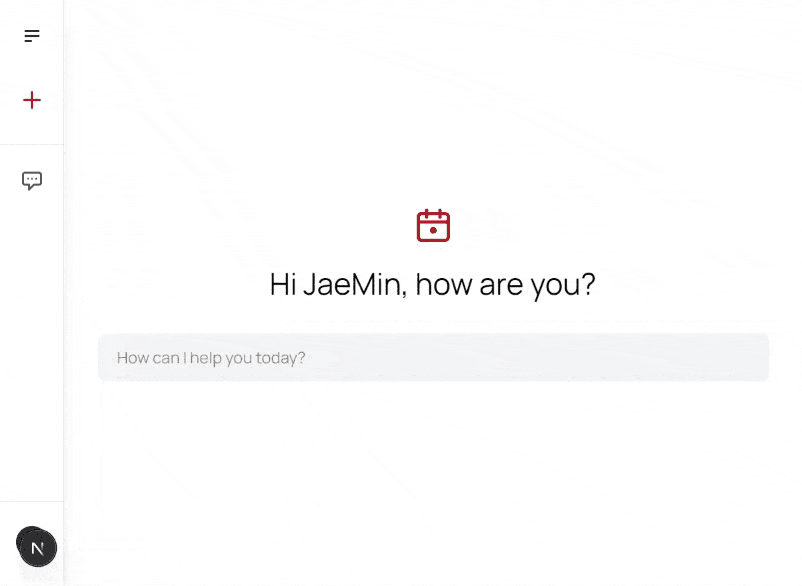
Overview
How do you put something on a calendar without filling in a form?
Context
HackPSU gives you 24 hours. Neil and I spent ours on one idea: type what you would say to a friend, and it lands on your Google Calendar. My focus was the database side: the Chat model, the Mongo connection, and the chat routes that read and write it.
The shape of it
One Next.js app. Google for sign-in and for the calendar, MongoDB for chats, and two model providers behind a single call. Nothing that needed a second deploy or a second language.
Code by area
Where 4,304 lines ended up
Lines of code at the final commit
Landing page and blog
13 files: sections, FAQ, nav, blog, sign-in
1,744
Chat app
7 files, led by the 935-line chat page
1,638
API and data
14 files: routes, Mongo model, auth, types
922
b84c0d7, the last of the hackathon. Blank lines included; config files, lockfile and media left out.Solution
Talk it through, then one button puts it on the calendar
Sign in once, calendar included
Google sign-in through NextAuth asks for calendar access up front, so there is no second "connect your calendar" step. The session it creates carries the token the export uses later.
A conversation, not a form
You type, the assistant answers, and it fills gaps the way a person would. It never asks which day you mean: today, tomorrow and the day after are spelled out in its instructions. If the end time is missing, that is the only thing it asks for.
Export turns the chat into events
When the plan is settled, Export sends the whole conversation to a second model pass that returns typed events, and each one is posted to Google Calendar. A short animation confirms it.
Two models, one toggle
A button in the chat header switches the next message between GPT-4o mini and Gemini 1.5 Pro. Chats sit in a sidebar where they can be renamed or deleted, and they are saved to MongoDB, so they are there when you sign in somewhere else.
Request path
"Lunch with Alex tomorrow at 1", from chat box to calendar
Request path, read from the code
Talk, on every message
- 01
The message goes up with the whole history
POST /api/chat { message, history, modelProvider } - 02
One call, the prompt rebuilt with today and tomorrow spelled out
generateText({ model, messages }) - 03
A reply in the format the prompt asks for
"... scheduled for ... Added to your Calendar."Note: Says added; nothing is added yet
- 04
Reply and history come back
{ message, history } - 05
The client saves the full message array
PUT /api/chat { chatId, messages } - 06
Written to that chat, if it is yours
Chat.findOne({ _id, userId }), chat.save()
Act, when you press Export
- 07
The whole conversation goes up
POST /api/calendar - 08
A second pass turns the chat into events
generateObject({ schema: calendarSchema }), GPT-4o mini - 09
Events that fit the zod schema
{ events: [...] } - 10
One POST per event, with your Google token
POST calendars/primary/events - 11
A count for the confirmation
"Created 1 events in your calendar"
api/chat/route.ts, api/calendar/route.ts and chat/page.tsx at commit b84c0d7.Iterations
Five rounds, and the one that mattered stopped asking questions
Forty commits landed in the 24 hours, from an empty create-next-app at 2:09 on Saturday afternoon to the last fix at 1:58 on Sunday. These are the five that changed how it works.
Sat 17:36
barely functional
Chats saved to MongoDB for the first time: the Chat model, a cached connection, and REST routes under
/api/chats.Sun 02:59
working prototype
Four routes folded into one
/api/chat, and the export arrived: a zod schema and a second model call that writes to Google Calendar.Sun 12:47
updated chat prompting
The assistant asked for the date, start and end time, with the current New York time pasted into its instructions.
Sun 13:14
ai relative time prompting
It stopped asking. The prompt now spells out today, tomorrow and the day after and rules out date questions, and the client began sending the whole conversation instead of one message at a time.
Sun 13:20
enabled model hot swapping
Gemini joined GPT-4o mini behind one flag: a handful of lines in the route and a toggle in the header.
The last half hour went to the demo videos, the blog and an animation pass on the chat.
Commits per hour
The 24 hours, commit by commit
Lines changed per hour
- API and data
- Chat app
- Landing page and blog
| When | API and data | Chat app | Landing page and blog | Commits |
|---|---|---|---|---|
| Sat 14:00 to 14:59 | 22 | 0 | 1,000 | 5 |
| Sat 15:00 to 15:59 | 0 | 383 | 126 | 4 |
| Sat 16:00 to 16:59 | 0 | 339 | 75 | 7 |
| Sat 17:00 to 17:59 | 595 | 450 | 0 | 1 |
| Sat 18:00 to 18:59 | 8 | 425 | 6 | 1 |
| Sat 19:00 to 19:59 | 0 | 0 | 0 | 0 |
| Sat 20:00 to 20:59 | 0 | 0 | 0 | 0 |
| Sat 21:00 to 21:59 | 0 | 0 | 708 | 6 |
| Sat 22:00 to 22:59 | 0 | 154 | 566 | 5 |
| Sat 23:00 to 23:59 | 0 | 0 | 0 | 0 |
| Sun 00:00 to 00:59 | 0 | 0 | 0 | 0 |
| Sun 01:00 to 01:59 | 0 | 0 | 0 | 0 |
| Sun 02:00 to 02:59 | 807 | 610 | 0 | 1 |
| Sun 03:00 to 03:59 | 0 | 0 | 0 | 0 |
| Sun 04:00 to 04:59 | 0 | 0 | 0 | 0 |
| Sun 05:00 to 05:59 | 0 | 0 | 0 | 0 |
| Sun 06:00 to 06:59 | 0 | 0 | 0 | 0 |
| Sun 07:00 to 07:59 | 0 | 0 | 0 | 0 |
| Sun 08:00 to 08:59 | 0 | 0 | 0 | 0 |
| Sun 09:00 to 09:59 | 0 | 0 | 0 | 0 |
| Sun 10:00 to 10:59 | 0 | 0 | 0 | 0 |
| Sun 11:00 to 11:59 | 0 | 0 | 0 | 0 |
| Sun 12:00 to 12:59 | 4 | 0 | 0 | 3 |
| Sun 13:00 to 13:59 | 134 | 265 | 501 | 7 |
git log --numstat on github.com/jaeminbird/Timely, Sat 29 March 14:09 to Sun 30 March 13:58, 2025 (Eastern). Lines added plus removed; config, lockfile and media left out. The first column includes the 163 lines create-next-app wrote.Under the hood
Two model calls: one to talk, one to act
Six decisions, in the order a message meets them on its way from the chat box to Google Calendar.
Engineering decisions
| Decision | Simple | Robust | What the code does | Next iteration |
|---|---|---|---|---|
| Sign-inapi/auth/[...nextauth]/route.ts | Yes | Partly | Google OAuth through NextAuth with JWT sessions. Requests the full calendar scope and copies the access token onto the session. | Refresh the token once expiresAt passes (the refresh token is stored but unused) and narrow the scope to calendar.events. |
| Data scopingapi/chat/route.ts, lib/mongodb.ts | Yes | Yes | Every chat query filters on userId, the session email. The Mongoose connection is cached on global so serverless calls reuse it. | Key chats on the stable Google id, already on session.user.id, instead of the email. |
| Conversation statechat/page.tsx | Yes | Partly | The client owns the thread: it sends the full history with every message, mirrors it to localStorage and PUTs the whole array to Mongo after each reply. | Load history on the server by chat id and append one turn. Today the newest message also arrives twice. |
| Model switchapi/chat/route.ts | Yes | Partly | One generateText call. A modelProvider flag picks Gemini 1.5 Pro or GPT-4o mini per request. | Fall back to the other provider when one fails. Today any error is a generic 500. |
| Date resolutiongetSystemPrompt() | Yes | Partly | The system prompt is rebuilt per request with today, tomorrow and the day after spelled out, and forbids asking for a date. | Resolve dates in code, in the user's zone. The clock prints in New York time but the day names use the server's zone. |
| Event creationapi/calendar/route.ts, schemas.ts | Partly | Partly | A second pass: Export sends the chat to generateObject (GPT-4o mini) against a zod schema, then POSTs each event to the Google Calendar API. | Make it a tool call in the chat turn and save the event ids. Exporting a chat again creates its events again. |
- Yes
- Partly
- Not yet
- Simple:
- the least code that does the job
- Robust:
- holds up with real users and edge cases
The simple column is nearly full and the robust one is not, which is the right trade for 24 hours. Each gap is a contained change, and the zod schema already means events reach Google as typed data, not parsed prose.
Reflection
What a second day would change
The best call of the weekend was the AI SDK. With both providers behind one generateText call, the model toggle cost a handful of lines at 1:20 on Sunday afternoon.
The weakest spot is the gap between talking and acting. The assistant says "Added to your Calendar" before anything is added, because the event only exists once you press Export. Next time, scheduling would be a tool call inside the conversation, with the new event's id saved on the chat, so saying it and doing it are one step.
I would also keep the history on the server and resolve dates in code, in the user's time zone. Both are small changes, and both are the kind you only find by reading your own code a while later.